Easy
UserLab
▾
Tour
About
Contact
v0.8.6
Session ID
—
copy
↺ New
Inputs (
0
)
?
Add input
Audio source
?
— add an input —
Add inputs and open their links
Layout
?
Solo
PiP
Side
Grid
Focus
Observer link
?
— add inputs first —
copy
open ↗
Record
?
⏺ Record
Opens a new tab.
Press ⏺ in that tab to start.
Transcript
?
▶ Start
■ Stop
copy
↓ .txt
✕
Transcript will appear here. Select an audio source and click Start.
×
Add input
×
Add camera
Use a phone or webcam
Add screen
Share a laptop or tablet screen
Cancel
Name
← Back
+ Add input
—
×
—
copy link
open ↗
remove
OK
Record session
This will open a new tab showing your session feeds.
Press
⏺ Record
at the bottom of that tab to start recording.
When finished press
⏹ Stop & Save
— the
.webm
file will download to your computer.
Cancel
OK — open recording tab
What are inputs
An input is anything you want to capture — a phone used as a camera, or a laptop screen.
Scan the QR code to connect a phone as a camera.
Open the link in a browser to share a laptop screen.
Got it
Audio source
Select which input is used to capture audio.
Usually, the camera (phone) closest to the participants.
Selected source is used for recording and transcription.
Got it
Layout
Select how your inputs appear on screen, for recording and streaming.
Got it
Observer link
Share this link with anyone who needs to watch the session live — moderators, stakeholders, notetakers.
The observer sees all your feeds in real time, read-only.
They cannot be seen or heard by participants.
No login required.
Got it
Record
Opens a new browser tab showing your live session.
Press
⏺ RECORD
at the bottom of that page to start recording.
When you press
⏹ STOP
, the recording saves locally to your computer as a
.webm
file.
.webm can be played in a browser, or
VLC
.
Got it
Transcript
Live speech-to-text using your browser's built-in speech recognition.
Works best in Chrome.
Got it
Mobile browser detected
EasyUserLab is designed for desktop use.
You can continue, but the layout may not display correctly.
OK
Easy
UserLab
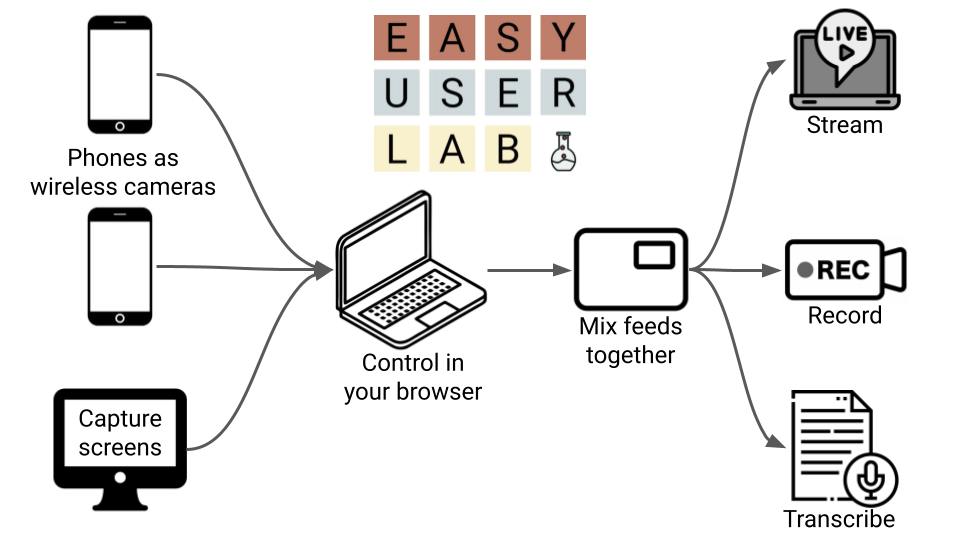
a free virtual user lab
Capture cameras & screens
Mix feeds together
Stream live to observers
Record your session
Transcribe speech to text
🗺 Tour
OK — get started
built by
adam
About EasyUserLab
Easy User Lab allows you to create a virtual research lab, completely in your browser
Capture cameras & screens
Mix feeds together
Stream live to observers
Record your session
Transcribe speech to text
What does it cost?
Nothing — it's free
Your browser is doing everything
Data & Privacy
Recordings and transcription never leave your computer — your browser is doing everything
Observers get an encrypted point-to-point connection from your computer, just like a video conference
Can I build a fixed / permanent lab using this?
You can, with a little help — contact
adam
Who made this?
Built by
adam
Close
Contact
Built by
adam
Close
Step 1 of 8
Title
Body
Watch video
Get started →
Got it